Supported Trading Platforms
Information about trading platforms compatible with Edmond Trader Funding.
Primary Platform: Rithmic
Edmond Trader Funding uses Rithmic as our primary trading platform provider. Rithmic offers professional-grade trading software with direct market access to major futures exchanges.
Rithmic Trader Pro
- Available for Windows (desktop application)
- Web version available at rithmic.com/rtraderpro-web
- Mobile app available for iOS and Android
- Real-time market data included
- Advanced charting and analysis tools
- Direct market access to the CME Exchange
TradeSea (partner)
Edmond partners with TradeSea for web and mobile trading on the same Rithmic credentials as R|Trader Pro.
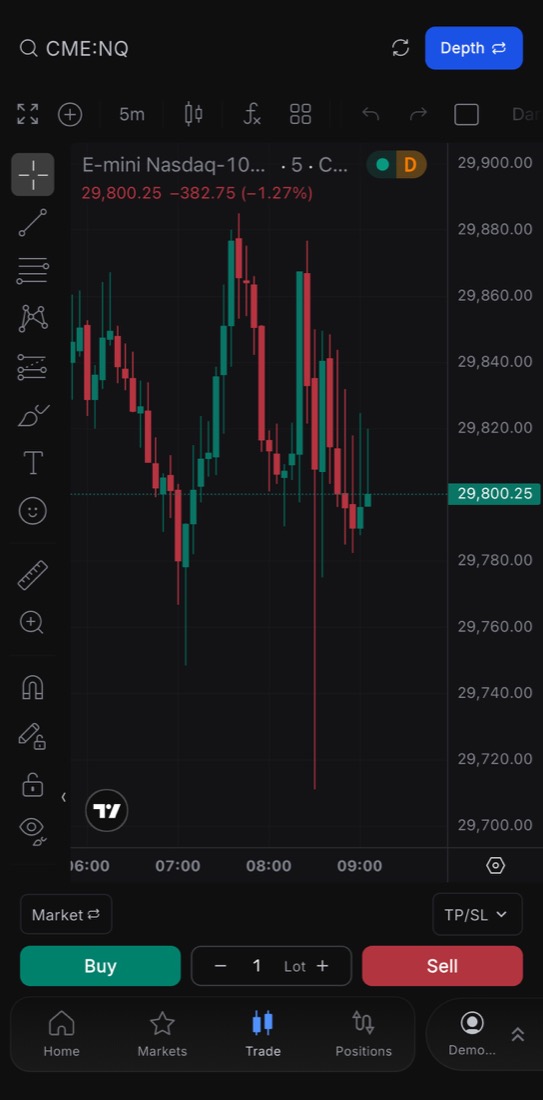
TradeSea mobile app
Install the app, sign in, then connect Edmond Trader Funding.
- Open the TradeSea app, or app.tradesea.ai → Account Centre → Connect New → Edmond Trader Funding
- Same User ID and password as Setup and Key (Simulation for eval)
- Onboarding: Connect TradeSea (Module 3B)
- Setup guide: TradeSea Platform Setup
- Official TradeSea help: Connect Account
Your own Quantower, NinjaTrader, or similar license
Edmond includes Rithmic credentials and TradeSea as a partner. We do not sell or include subscriptions for Quantower, NinjaTrader, TradingView, or other third-party platforms.
If you already have an active personal subscription to a platform that connects through Rithmic, you may use it with your Edmond User ID and password. You are responsible for that license, its fees, and its setup. Evaluation accounts use the Rithmic Simulation environment. NinjaTrader steps: Connect NinjaTrader.
Rithmic plugin mode lets many of those platforms attach to the same data feed:
Using Plugin Mode
- First, run Rithmic Trader Pro
- Before logging in, click "Allow Plugins"
- Login to Rithmic Trader Pro (keep it running)
- Connect your third-party application via plugin mode
- Rithmic Trader Pro must stay running while using the plugin
System Requirements
Windows
- Windows 10 or later (64-bit)
- 4 GB RAM minimum (8 GB recommended)
- Stable internet connection
Mac
- Use web version: rithmic.com/rtraderpro-web
- Or run Windows via virtualization
- Mobile app available for iOS